


Beskrivelse
WebAlive Registration / Connect: This plugin uses WebAlive's Connect registration flow for updates and remote installs. If your domain is not approved yet, it will show a "registration required" message in WP Admin (no hard errors). Start Connect from the WebAlive screen and complete approval to enable updates.
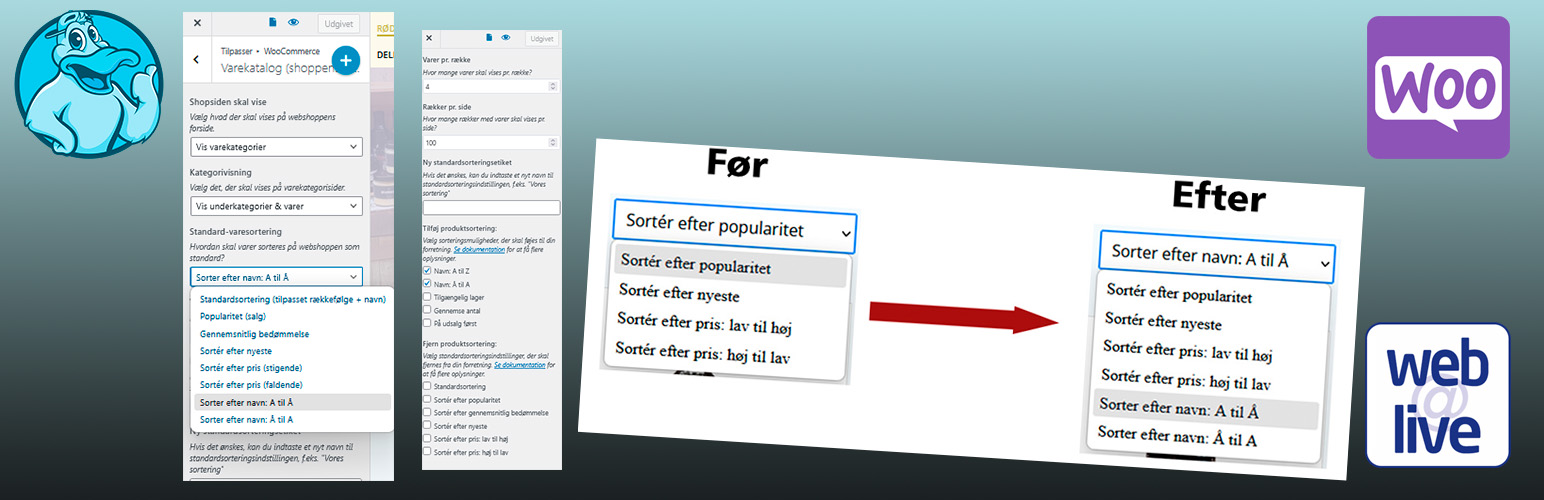
Woo Wa Product Sort Options provides options that extend the default WooCommerce orderby options on the shop page. You can optionally set a new name for the default sorting (helpful if you've used this to create a custom sorting order), and can enable up to 5 new sorting options: alphabetical, reverse alphabetical, on sale, review count, and availability product sorting. You can also remove core sorting options, or remove the sorting dropdown completely.
Requires: PHP 7.4, WooCommerce 3.9+ and WordPress 5.6+
Features
Includes options to:
- rename default product sorting (i.e., change to "Our Sorting")
- enable alphabetical product sorting
- enable reverse alphabetical sorting
- enable on sale sorting (note: works only for simple products)
- enable sorting by inventory / availability
- enable sorting by review count (most reviews to least)
- remove core sorting options
Rename Default Sorting
You can customize your product sorting order on your shop pages - here's a handy tutorial to do so. However, many shop admins like to then rename this from "Default Sorting" to something more descriptive, such as "Our Sorting" or "Our Selection". You can optionally enter a new name for this sorting order if desired.
Adding Sorting Options
When you create a customized sorting order, you lose the ability to sort products alphabetically. This plugin gives you the ability to add new sorting options to list products by title A to Z or in reverse order (Z to A).
Want to show items with the highest stock first? You can enable sorting by availability, which will enable sorting from high stock to low stock (See FAQ for more details). You can also sort by the number of product reviews.
You can add the option to sort items by sale status - there's a sorting option to show "On Sale" items first in the shop catalog. Please note that only simple products can be sorted by sale status, and variable products will display mixed with non-sale products.
Remove Sorting Options
You can remove the core sorting options as well! If all sorting options have been removed, the sorting dropdown will become hidden on shop pages.
Translations
The plugin text domain is: woo-wa-product-sort-option
More Details
- View all Webalive WooCommerce extensions
- View the FAQ for some tips.
Ændringslog
2.11.1
- Marked as tested with WordPress 7.1 and WooCommerce 11.1.0.
2.11.0 (2026-08-02)
- Feature: New "Featured First" sorting option that lifts featured products to the top of the shop loop.
- Feature: "On-sale First" now works for both simple and variable products (previously simple only).
- Feature: Extra sorting is now applied to WooCommerce shortcodes (
) and to blocks that pipe through the shortcode query, so labels and ordering match on classic and block-based catalog pages. - Fix: Corrected an include path that caused a fatal error when opening the WooCommerce customizer (
class-woo-wa-customizer-checkbox-multiple.php). - Fix: Synced the internal
VERSIONconstant so plugin upgrade routines and asset cache-busting use the current release. - Tweak: Whitelist sanitizer for the customizer settings so unknown sorting keys are dropped instead of stored.
- Tweak: Memoized theme mod lookups to reduce repeated
get_theme_mod()calls per request. - Tweak: Defensive casting of
woo_wa_product_sort_optionreads to prevent PHP 8 warnings when the option is empty. - Tweak: Replaced deprecated
is_ajax()withwp_doing_ajax(). - Tweak: Hardened
$_GET['orderby']handling withwp_unslash(). - Tweak: Escaped URLs and text in the outdated-WooCommerce admin notice.
- Tweak: Escaped plugin action link labels with
esc_html__(). - Tweak: Split assignment-in-condition patterns in the customizer setup for cleaner PHPCS output.
- Tweak: Load required admin includes and verify the legacy plugin exists on disk before calling
delete_plugins(). - Compatibility: Tested with WordPress 7.0 and WooCommerce 10.7.

2024.10.23 - version 1.0.0
- Initial Release